
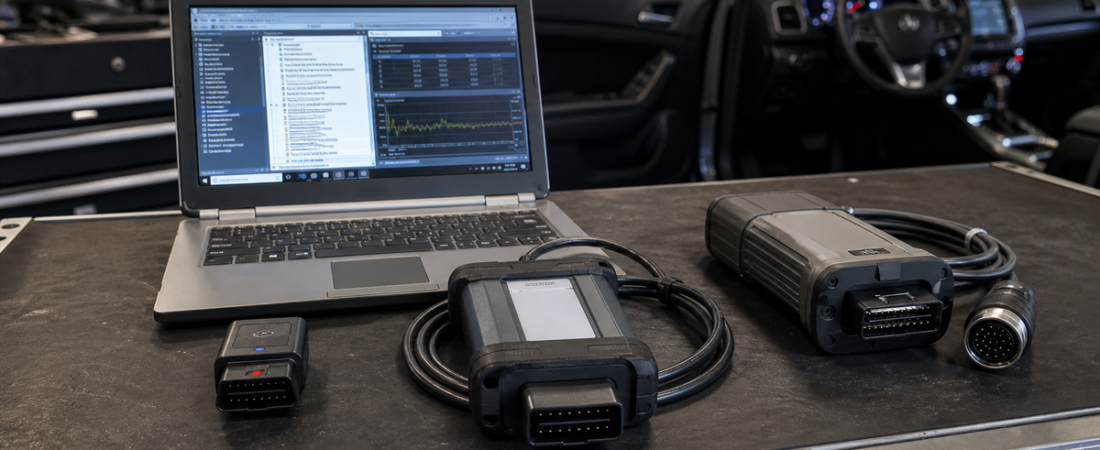
J2534 vs OEM VCI vs ELM327: Which Diagnostic Interface Should You Buy?
Diagnostic software gets most of the attention, but the interface you plug between the laptop and the vehicle often determines what you can actually do. Two buyers can install the same application and get completely different results simply because one is using a basic Bluetooth dongle while the other has the correct pass-thru or factory interface.
That is why the J2534 vs OEM VCI vs ELM327 decision matters so much. These three interface categories may all connect to the OBD-II port, but they are built for very different jobs. One is meant for entry-level code reading, one is designed as a flexible professional pass-thru option, and one is tailored for deep manufacturer-specific work.
If you are still learning the full diagnostic stack, start with our Guide du débutant sur les logiciels de diagnostic OBD2. If you are already comparing software depth, our OEM vs aftermarket diagnostic software guide explains why the interface choice should match the software strategy, not just the lowest price.
What These Three Interface Types Actually Are
ELM327 is the simple entry point. It is usually a low-cost USB, Bluetooth, or Wi-Fi adapter that works well for generic OBD-II functions such as reading and clearing powertrain fault codes, checking readiness monitors, and viewing a limited set of live data.
J2534 is the flexible middle ground. A J2534 pass-thru device acts as a standards-based bridge between Windows software and the vehicle. It is commonly used with platforms that support pass-thru communication, including Toyota Techstream and some Volvo VIDA workflows. The local OBD-Soft Techstream source is a good example: it specifically instructs users to install the driver and select Mongoose JLR as the interface in the VIM menu before the first scan.
OEM VCI means a dedicated factory-style vehicle communication interface built around one manufacturer or platform family. BMW ISTA+ packages are commonly paired with ENET, K+DCAN, or ICOM depending on the vehicle and task. Renault CAN Clip uses the VCI3 path. Mercedes Xentry is usually at its best with SDConnect C4 or C5 style hardware. These interfaces are designed around the exact software logic and often unlock the deepest functions.
Quick Comparison Table
| Interface Type | Best For | Main Strength | Main Limitation |
|---|---|---|---|
| ELM327 | Beginners, quick code checks, basic live data | Very affordable and easy to use | Limited module access and almost no advanced coding or programming |
| J2534 Pass-Thru | Shops needing one flexible interface for compatible OEM apps | Good balance of depth, flexibility, and cost | Only works well where the software truly supports J2534 |
| OEM VCI | Brand specialists and advanced factory-level diagnostics | Deepest compatibility with OEM software and guided functions | Usually tied to one brand, platform, or workflow |
When ELM327 Is Enough and When It Is Not
ELM327 is fine when your goal is basic OBD-II work. If you want to scan a check-engine light, clear generic codes after a repair, watch coolant temperature, or confirm emissions readiness, it is often the fastest and cheapest option. It also makes sense for DIY users who are not planning to code modules, run service software, or work on several manufacturer-specific systems.
The problem starts when buyers expect dealer-level behavior from a generic adapter. ELM327 was never designed to replace dedicated workshop hardware. It usually does not handle factory test plans, deep module coding, immobilizer procedures, or the more demanding communication paths used by OEM software. If your plan includes Techstream, Xentry, ISTA+, CAN Clip, or similar platforms, ELM327 should be treated as a supplementary tool, not the main interface.
Why J2534 Is So Popular
J2534 became popular because it gives many users a practical step up from generic scanning without forcing them into a separate factory interface for every brand. A good pass-thru device can cover real workshop tasks when the software officially supports it, especially for service procedures, guided diagnostics, and some programming or calibration workflows.
The key advantage is versatility. The local OBD-Soft source material shows this clearly. In the Techstream package, the workflow depends on installing the cable driver and selecting the correct pass-thru device in the VIM settings before the first connection. VIDA setups can also rely on J2534 hardware in some configurations, which is why J2534 appeals to shops that need more than code reading but do not want a dedicated interface for every make on day one.
The tradeoff is that J2534 is only as good as the software support behind it. If the application expects a factory VCI for full function coverage, a pass-thru may still connect but not deliver every coding, programming, or guided workflow cleanly.
Where OEM VCIs Clearly Win
OEM VCIs are the right answer when you need maximum compatibility, deeper brand-specific access, and fewer surprises inside dealer-style software. The local ISTA+ source explicitly asks the user to choose the correct diagnostic tool during installation, such as ENET, K+DCAN/Ediabas, or ICOM. That is not a small detail. It reflects the fact that BMW diagnostics depend on the right hardware path for the job and vehicle generation.
The same pattern appears across the other OBD-Soft packages. Our Guide d'installation de Techstream depends on the correct Mongoose driver and VIM selection. The Renault CAN Clip setup guide is built around the VCI3 interface workflow. Mercedes Xentry installs are usually most stable with SDConnect C4 or C5 style hardware because the software expects that class of communication during deeper diagnostics.
If you run a brand-focused workshop, the OEM VCI usually pays for itself in reduced setup friction and better support for advanced tasks.
Which Interface Fits Your Real Use Case?
- Choose ELM327 if you only need generic codes, simple live data, and a low-cost entry point for occasional use.
- Choose J2534 if you want a more serious pass-thru device for compatible OEM applications and broader workshop flexibility.
- Choose an OEM VCI if you specialize in one brand or need the deepest coding, configuration, and factory-style diagnostic support.
For many workshops, the smartest path is layered rather than absolute. Use an inexpensive ELM327 adapter for quick generic checks, keep a J2534 device for supported OEM and service workflows, and add dedicated OEM interfaces for the brands that bring the highest-value work into your bay.
Buying Mistakes to Avoid
- Do not buy an interface first and hope the software will adapt later.
- Do not assume every OEM app supports J2534 equally well.
- Do not expect ELM327 to handle coding or manufacturer-level special functions.
- Do not ignore driver quality, cable stability, and USB behavior on the laptop.
- Do not choose the cheapest path if your business depends on reliable advanced diagnostics.
Conclusion finale
The best answer to J2534 vs OEM VCI vs ELM327 is not one universal winner. ELM327 is ideal for basic OBD-II work, J2534 is the flexible professional middle ground, and OEM VCI hardware is the right tool when you need full manufacturer-specific depth.
Buy according to the software you plan to run and the jobs you actually perform. That approach prevents mismatched expectations, saves time during setup, and gives your diagnostic laptop the hardware layer it needs to work properly.
 English
  German
  Spanish
  Italian
  French
  Hebrew
  Dutch
Dutch  Finnish
  Norwegian
  Swedish
  Polish